myHistoryTool
I have no idea whether or not AGI is achievable or if LLMs are the right path. I cannot control whether computers take my job, though it certainly feels that way. I have a distaste for tech debates. To avoid confusion, this isn't the actual game American Indian Wars- a separate project being created by real humans. History engine is an internal tool.
It's a skill issue:
JSON Is Truth, Python Is State, AI Is Tool
AI is a tool that is currently useful in some cases and not great in others.
I find it very helpful for data, drafts, sorting, OCR repair, prompt generation, first-pass summaries, batch work, and repetitive pattern work. It is not a fact checker. For now, AI is not the final programmer, artist, or designer. It does not get to decide the state. Often, what is useful can also be done with human-developed software, though at much greater cost in time and resources.
JSON is not the right format for every problem, but it serves our purpose quite well, and it is usually the best default. It is readable, works everywhere, and is easy to validate.
Python turns those files into something the app can use. It loads records, connects them, tracks the current state, executes commands, applies rules, and decides which information the AI receives.
Vector search is useful for fuzzy discovery: finding similar passages, rough matches, OCR weirdness, and language that does not line up cleanly. The main brain is the knowledge graph: people, places, events, sources, images, prompts, and outputs connected by IDs and rules that the app can inspect.
AI comes after. It explains, narrates, drafts, summarizes, repairs, and helps generate in-context media.
The History Engine:
- The Terminal Tool
- ASCIInator3000
- Prometheus PDF
High Level
- Source material comes in through Prometheus PDF when it starts as a PDF, a scan, a newspaper, an image, or a damaged OCR.
- Reviewed records live in JSON because they need to be readable, editable, portable, and testable.
- Python loads those records and runs the app’s actual state.
- AI selects relevant information and helps with narration, drafts, repairs, prompts, and summaries.
- ASCIInator3000 handles terminal art, animation, effects, and export formats.
- The terminal is the interactive front end with a variety of modes and outputs.
Prometheus PDF
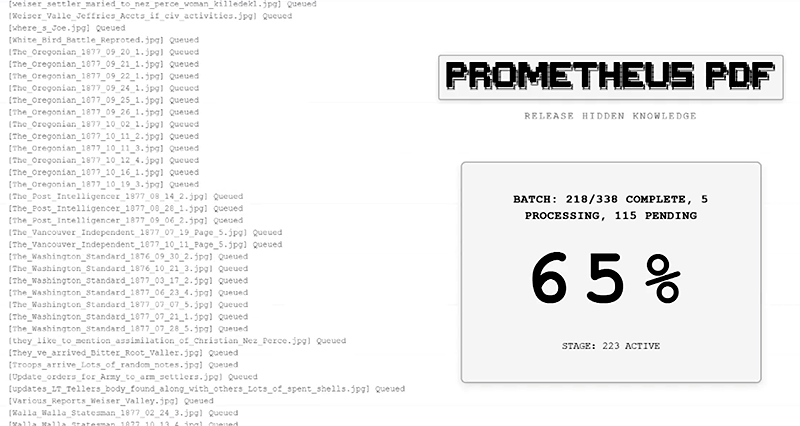
Primary source historical material is often dirty and lacks consistent structure. They are typically PDFs, crappy scans, oddly columned historical newspaper images, old reports, or artifact-heavy OCR. Prometheus batch converts disparate source formats into consistent, structured forms that can be viewed, repaired, checked, indexed, and connected.
The current knowledge base (any would work) in the engine is built around the 1877 Nez Perce War. I am obsessed with history, have collected around 3000 primary source documents on this subject, and needed an easy way to view, organize and edit them.
- Converts PDFs into editable web pages.
- Converts images into editable web pages.
- Preserves the original file so the generated page can be checked against it.
- Handles standard PDFs with local text extraction, avoiding AI calls.
- Handles clean scanned PDFs by converting pages to images, keeping useful images, and extracting text.
- Handles large scanned PDFs with local OCR, so big jobs do not die on API limits.
- Handles degraded images and newspapers with OCR preprocessing and layout handling.
- Saves each result as a generated page with its own output folder.
- Stores extracted or preserved images with the generated page.
- Can create an optional structured JSON for a processed document.
- Supports single-file jobs.
- Supports batch jobs with per-file progress and error tracking.
- Let the user select bad text in a generated page and repair it.
- Let the user select a section and redesign it as cleaner page HTML.
- Let the user generate an illustration from selected text.
- Persists repair and generation changes in the page instead of dropping them after preview.
- Builds an index over generated outputs.
- Builds a browsable site from generated outputs.
- Builds a knowledge map across processed documents.
- Can backfill repair and structure tools into older generated pages.
Source work is the slowest and messiest part. If the source material is bad, everything after it is bad. The first job is getting the database into a form that a human can easily view, inspect, and repair. After this, the tool will structure the data optimally for code and AI.
ASCIInator3000

ASCIInator3000 is for terminal art and export. The engine needs text-safe output, ANSI format, animation output, shareable project files, and formats that can move between tools and modes. A normal image generator does not solve that by itself.
- Converts images into ASCII art.
- Converts typed text into ASCII art.
- Processes PDFs for OCR and conversion work.
- Cleans OCR text.
- Imports GIF frames for animation work.
- Let frames be arranged on a timeline.
- Lets use text frames and image frames together.
- Lets reorder the frames with drag-and-drop.
- Supports audio-driven visual effects.
- Supports terminal effects such as reveal, fade, pulse, color shift, scanline, wave, and flicker.
- Can bake effects into animation frames.
- Exports terminal true-color ANSI files.
- Exports basic-color ANSI files for simpler terminal support.
- Exports plain text.
- Exports Markdown.
- Exports HTML.
- Exports static HTML.
- Exports JSON project data.
- Imports JSON project data back into the tool.
- Exports PNG images.
- Exports the current frame.
- Exports all frames.
- Exports sprite sheets.
- Exports GIF animations.
- Supports transparent backgrounds for image/GIF export.
- Let the user choose the FPS for GIF export.
- Supports Web Share and clipboard sharing when the browser allows.
- Includes batch image processing scripts.
- Includes sprite-sheet splitting scripts.
Terminal Tool
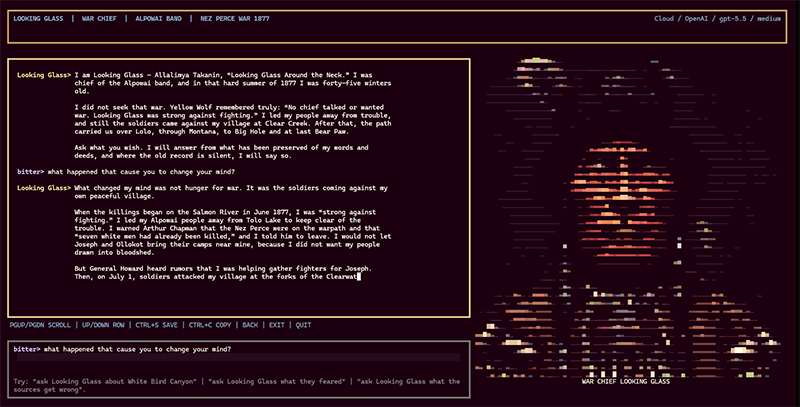
The Terminal Tool is where the user interacts with the engine in a variety of modes.
- Runs as a terminal app.
- Uses fixed screens, menus, panels, portraits, event art, and location art.
- Loads reviewed JSON records for events, people, places, routes, quotes, source links, rules, encounters, units, and casualties.
- Keeps hard facts out of the model’s control.
- Supports local AI through Ollama.
- Supports cloud AI.
- Has a Professor mode for learning, questions, lessons, and quizzes.
- Has a persona chat for talking with historical figures, based on available source.
- RPG mode where you can play as the Nez Perce on the survival path.
- Tracks food, water, fatigue, morale, pressure, wounded, horses, ammo, and supplies.
- Moves through the historical event chain instead of a loose, invented map.
- Has trivia mode built from source records.
- Has Content mode for drafts, prompts, scripts, articles, series, image plans, video plans, and engine art.
This works well if the engine owns state. The AI can describe a hard march, a council, a battle, or a provide an age appropirate classroom explanation. It should not decide the facts of those things, numbers, or any absolutes at all.
Content Mode
Content mode lets you turn the knowledge into useful output without having to start from a blank prompt every time. Think 'curriculum.'
- /xpost drafts a short post.
- /thread drafts a post series.
- /image drafts or runs image prompts.
- /video drafts or runs video prompts.
- /short drafts short-form scripts.
- /long drafts, longer scripts.
- /script drafts screenplay-style scenes from selected records.
- /article drafts longer researched pieces.
- /blog drafts shorter posts.
- /myblog drafts blunt project/build-log posts.
- /series builds a page-by-page graphic series, including scripts and image prompts.
- /review latest checks, weak drafts, or series packages.
- /superseries builds engine art plans for an event and its sub-events.
- /superseries script builds engine art beats from a screenplay pass.
- /superimage builds a multi-image series for a person, event, or location.
- /convert converts image files into ANSI in place and puts them in the appropriate src directory.
- /primary drafts from primary-source material.
- /campaign drafts a campaign plan.
- /schedule drafts a posting schedule.
- /repurpose turns one draft into another format.
- /brief drafts a strategy brief.
- The kill queue stops waiting for image and video jobs before the next asset starts.
Engine Content
The automated engine media tools are designed to convert and/or create terminal-supported formats.
- Event art exports to event asset paths.
- Sub-event art exports under the parent event.
- Person art exports to portrait paths.
- Location art exports to location paths.
- Generated images are converted to ANSI.
- The terminal game can pick up the exported art by ID.
- /superseries can generate a parent event and all its sub-events in a single batch.
- limit=N can restrict a batch.
- range=A-B can select a slice of sub-events.
- ref can use matching reference images.
- style=godot, style=cashbook, and style=pulp select the visual direction.
This outputs content in supported formats, displays it in the right places, and ties it to the proper sources.
AI Controls
The AI controls are there because models drift into generic scenery, they leak, and they forget. They will always but only sometimes produce bad output. You cannot "prompt" your way out of these outcomes.
- Private policy rules live outside the historical records.
- Runtime feedback is logged separately from historical records.
- Python can warn future prompts about repeated mistakes.
- Prompt checks catch generic scenic-overlook drift before image jobs run.
- Prompt checks catch missing location facts.
- Prompt checks catch missing actor facts.
- Prompt checks catch backend words that should not appear in the output.
- Prompt checks catch unsupported visible text/signage instructions.
- Prompt checks catch internal style labels leaking into prompts.
- Series packages are reviewed before images are generated.
- Bad JSON can be repaired or rejected.
This is is a small memory file and set of checks. 'Persistant' and 'learns' in the AI sense of the word. So not real.
I believe AI is useful when it has a job and it is bad when it is expected be the authority.
The History Engine turns primary sources, rules, media, and AI assistance into an interactive historical agent.
Spend a lot of time structuring information into clean formats. Convert them to runtime objects. Cache what needs caching. Let Python (or whatever) run the rules. Let AI help with ideas, learning, 'natural language' and all the repetitive work.